
Reusable Content Without the Maintenance Headache
Upgrade to
CopySync Pro
Keep repeated content synced across your WordPress site from one central source.
CopySync lets you build reusable sections once, then display them anywhere using blocks, shortcodes, or simple markers. Update the original content and every connected section updates automatically.
Perfect for shared calls-to-action, pricing notes, feature lists, policy text, product details, reusable layouts, and content templates that appear across multiple pages.
Reusable Content
Create a section once and reuse it anywhere across your site without duplicating content.
One Update Everywhere
Edit the original source and every synced version updates automatically.
Built for Gutenberg
Works naturally inside the WordPress block editor with simple source selection.
Flexible Templates
Create reusable layouts with editable placeholders for page-specific content.
Build once. Update everywhere.
CopySync helps you stop rebuilding the same content over and over across your website.
Instead of copying and pasting sections between pages, you create a single source version and reuse it anywhere you need. When the original changes, every connected section updates automatically.
CopySync makes managing repeated content far simple. It reduces mistakes caused by outdated or mis-copied content.
It also becomes a lightweight reusable content system that works with Gutenberg blocks, shortcodes, reusable layouts, WooCommerce pages, custom templates, widgets, and dynamic site content.
Create smart reusable templates using CopySync variables. This allows the structure and layout to stay synced while individual words, buttons, links, or headings can change per page.
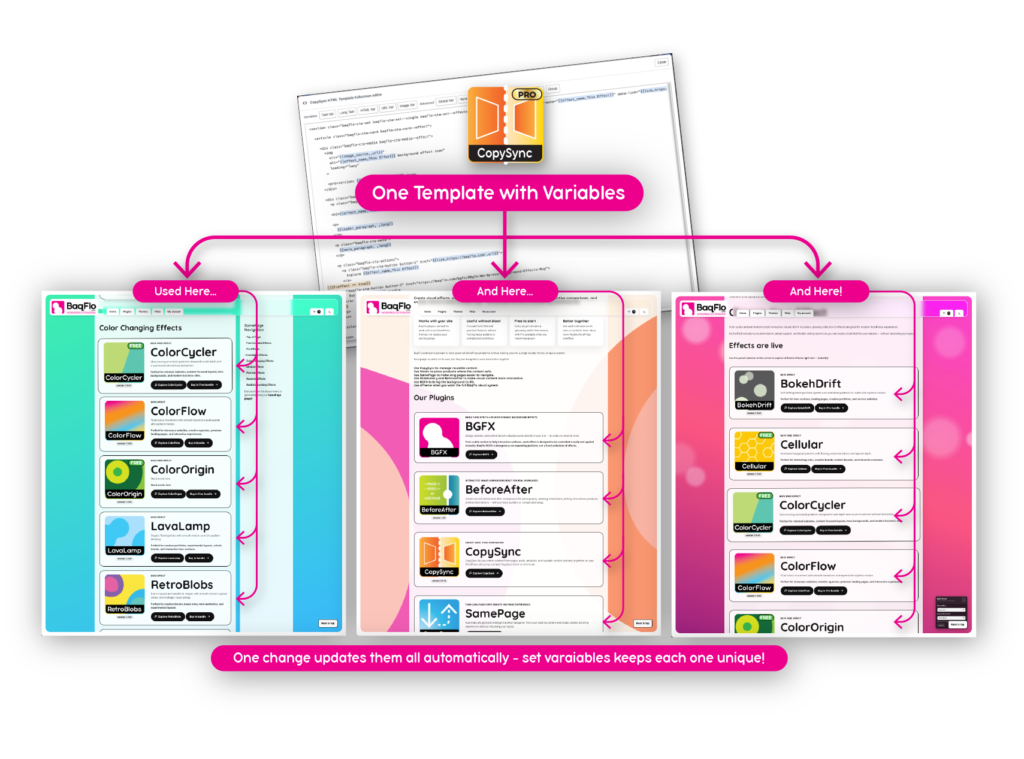
Typical examples include:
CopySync is extremely flexible in workflows. You can simply copy a page directly for simple duplication, or you can create a super flexible internal templating system giving you full control on reusable snippets and their content.
Build reusable site sections that non-technical editors can safely update without breaking layouts.
Changing designs of sections only needs to be done once, and every section using the source will update. CopySync Variables means the content stays separated from the structure allowing efficient updates and peace of mind that nothing has been forgotten.
Ideal for agencies, WooCommerce stores, client sites, and large content-heavy websites.
CopySync Free vs ProVERSION: 01.86 |
 Free
Free
|
 Pro
Pro
|
|---|---|---|
| Reusable content, synced automatically | ✓ | ✓ |
| Block editor integration | ✓ | ✓ |
| Shortcode support | ✓ | ✓ |
| Use in posts, pages, products, widgets, and templates | ✓ | ✓ |
| CopySync HTML template block | ✓ | ✓ |
| Maximum active snippets | 5 | Unlimited |
| CopySync Variables | ✓ | ✓ |
| Per-page variable overrides | ✓ | ✓ |
| Variable sync support | ✓ | ✓ |
| CopySync List block | ✓ | ✓ |
| Additional variable support | No | ✓ |
| Extensions’ version variables | No | ✓ |
| CopySync Logic support | No | Basic logic support |
| CopySync Loop support | No | ✓ |
| Nested Source Exclusion Selection | No | ✓ |
| Pricing | Free |
Only $26.90 per year
or $79.00 for Lifetime |
Free version
Everything you need to build and manage reusable synced content across your website.
Includes up to 5 active CopySync snippets.
CopySync Pro adds:
- Global Variables
- Extension Version Variables
- Logic Support
- Loop Support
- Nested Source Exclusion Selection
Core features
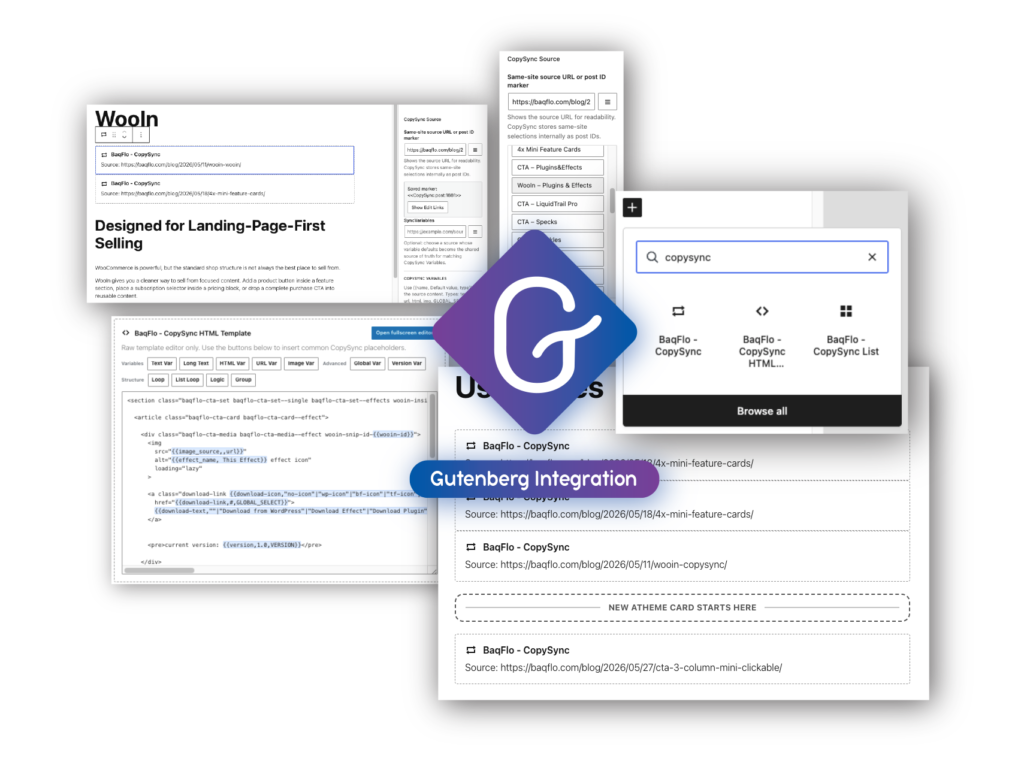
Gutenberg Block integration
Use CopySync directly inside the WordPress block editor without complex setup.
CopySync HTML template editor block
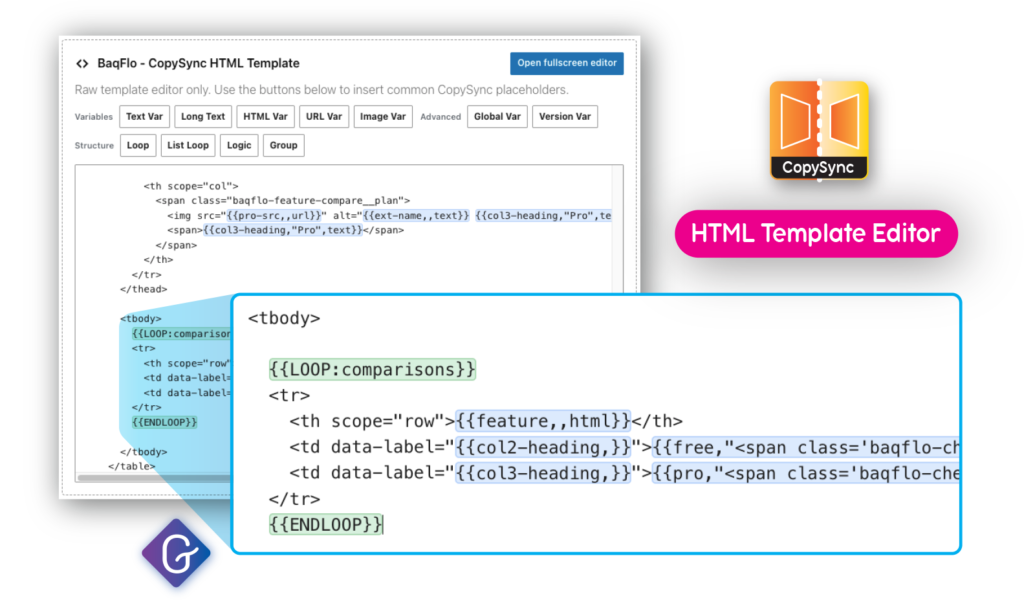
Dedicated CopySync Template Editor designed specifically for reusable HTML templates. Helps preserve formatting and custom markup while providing quick insertion buttons for variables, template snippets, and tab control. CopySync HTML template editor block also automatically highlights CopySync variables, groups, loops, and logic statements for quick and easy identification.
Simple marker support
Use CopySync in classic text editors, HTML blocks, widgets, or template files using markers or shortcodes.
Simple marker format:
<<CopySync:https://example.com/source-page/>>
<<CopySync:post:123>>
<<CopySync:id:123>>


Shortcode format:
[copysync source="https://example.com/source-page/"]
[copysync id="123"]
[copysync]https://example.com/source-page/[/copysync]
Works with WooCommerce
Reuse feature descriptions, shipping notices, warranty details, and shared product content. Combine the power of CopySync and WooIn to create completely new shop avenues previously requiring full custom theme templating.
CopySync Variables
Turn reusable content into editable templates using CopySync Variables.
This allows layouts and structures to stay synced while individual content remains changeable per page.
Some variable examples:
Per-Page overrides
Editors can customise variable values directly inside the block sidebar without editing the original source. Editing and source overrides can also be locked.
Sync Variables
Create a shared data source for variables across multiple synced sections.
This is useful for centralised feature names, pricing labels, product names, or repeated shared values.
CopySync Lists + Post categories
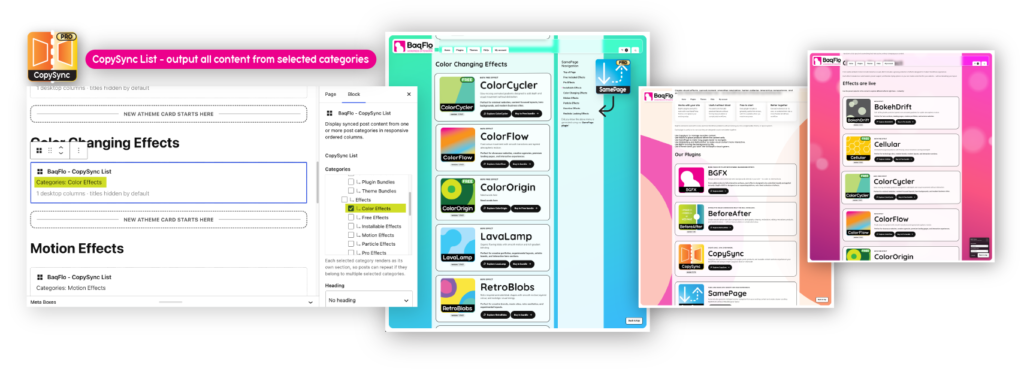
Fetch CopySync sources on post categories, with the ability to output them into responsive columns. Perfect for building fully designed product lists.
Advanced variable types
Use variable types for safer handling of URLs, long content, and HTML by content editors.
Reusable design systems
Build reusable site sections that non-technical editors can safely update without breaking layouts. Changing designs of sections only needs to be done once, and every section using the source will update. CopySync Variables means the content is separated from the structure allowing efficient updates and peace of mind nothing has been forgotten.
Ideal for agencies, WooCommerce stores, client sites, and large content-heavy websites.
Pro Features
∞ Unlimited active CopySync snippets
With the Pro version, you can use this very powerful plugin to its full potential.
CopySync Loop support
Create repeating segments with variable loop ability. This can be used to create tables like the Free vs Pro comparison table above.
{{LOOP:features}}
<tr>
  <td>{{feature,"<span class="this-has-html">Feature</span>",html}}</td>
  <td>{{free,"X"}}</td>
  <td>{{pro,"✓"}}</td>
</tr>
{{ENDLOOP}}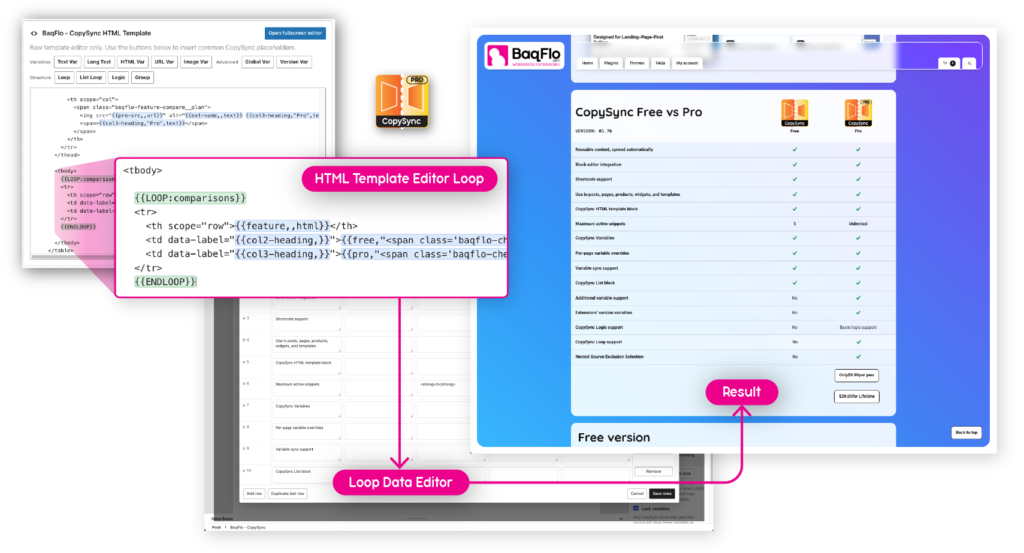
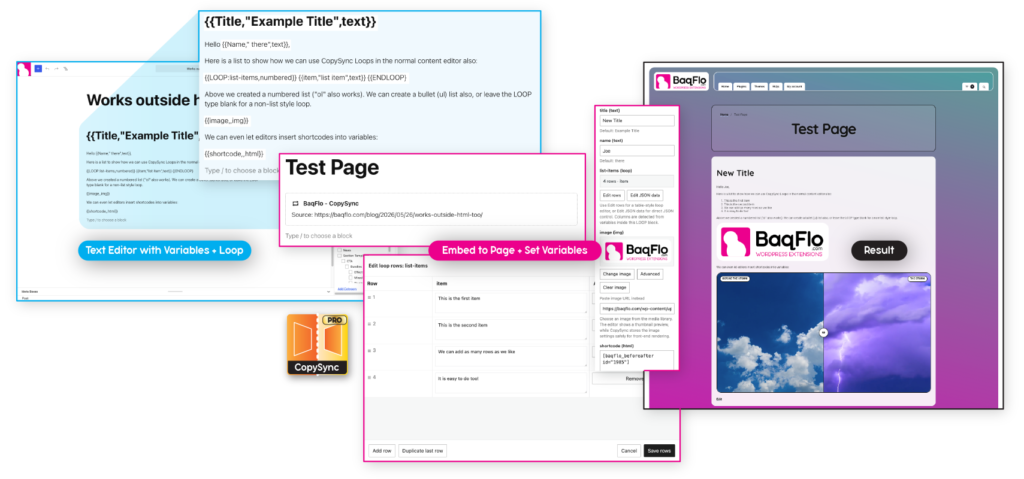
The loop feature and all variables work inside the standard Gutenberg text editor, including special loops for creating bulleted and numbered lists.
Basic variable logic support
CopySync supports basic logic with IFs and ORs on variables. Just enough to make powerful decisions, and reducing the need for css hacks. If variable is already set, it will check against its value – if not, a new variable input for that variable is added to the sidebar. Supported operators: ==, !=, >, >=, <, and <=.
{{IF:SYSTEM:user.logged_in == true}}
  <a href="/my-account/">My Account</a>
{{ELSE}}
  <a href="/my-account/">Login</a>
{{ENDIF}}


{{IF:SYSTEM:woo.cart_count > 0}}
  <a href="/cart/">View Cart</a>
{{ELSE}}
  <a href="/shop/">Start Shopping</a>
{{ENDIF}}


{{IF:SYSTEM:version.plugin.samepage >= 1.12}}
  SamePage advanced features available.
{{ELSE}}
  Please update SamePage.
{{ENDIF}}
Advanced variable support
Additional variable options that are only available in Pro version:
Grouping support
Creates a visual group within the Variables Editor. Wrap related variables to keep templates organised, or use the same group name in multiple locations to combine those variables into a single editable section.
{{GROUP:Buttons}}
  {{button_text,Learn More,text}}
  {{button_url,#,url}}
  {{button_icon,"→",text}}
{{/GROUP}}

OR Combine sections in multiple locations into the same group

{{GROUP:Buttons}}
  {{primary_text,Buy Now,text}}
  {{primary_url,#,url}}
{{/GROUP}}

...

{{GROUP:Buttons}}
  {{secondary_text,Learn More,text}}
  {{secondary_url,#,url}}
{{/GROUP}}
Nested source exclusion settings
When CopySync Pro imports a source, it automatically scans that source for any embedded CopySync content. If nested CopySync sources are found, they are displayed as a checklist during setup.
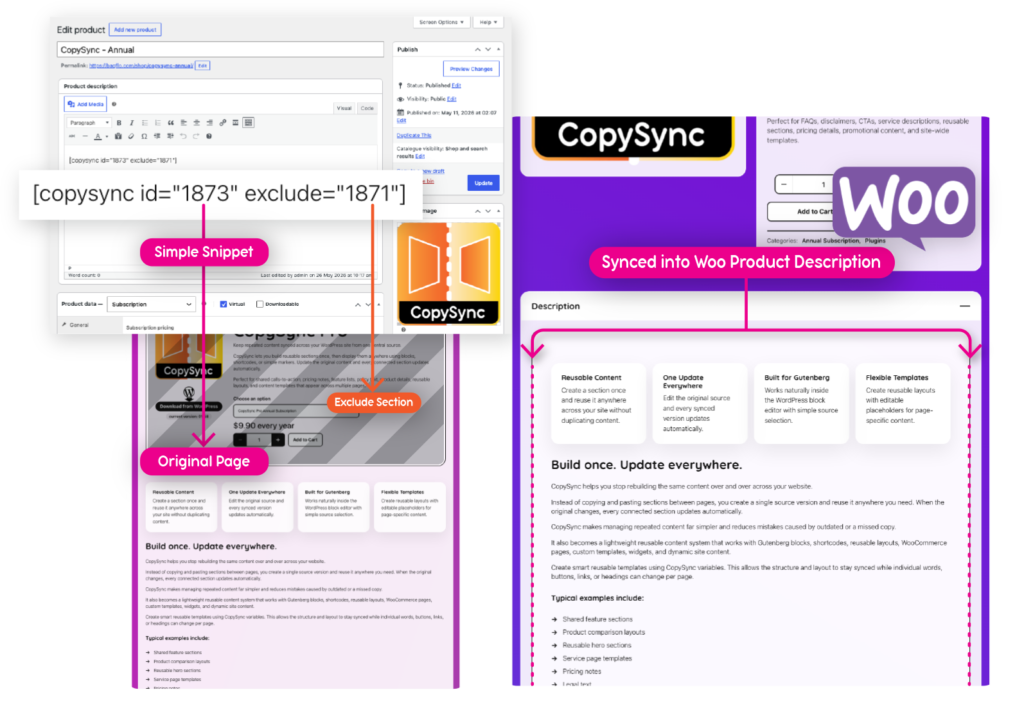
By default, all nested sources are included, but you can selectively exclude any of them from the final output. This allows you to reuse large sections of content while removing elements that may not be appropriate in every location.
Nested sources can also be excluded directly within a shortcode or CopySync marker:
[copysync id="123" exclude="21,53"] or <<CopySync:id:123 exclude="21">>
The comparison below shows how we use this feature on our own website. The left image is our main CopySync showcase page (the page you are currently viewing). This page includes a reusable product purchase template created using CopySync and WooIn, which is displayed at both the top and bottom of the page.
Rather than maintaining a separate description, we simply embed the page content directly into the WooCommerce product description using CopySync. This keeps both pages synchronised and eliminates the need to update the same content in multiple locations.
However, displaying the purchase template inside the product description would result in duplicate purchase buttons and payment options leading to some confusion. Using CopySync Pro’s nested source exclusion feature, we can embed the entire page while excluding just the purchase template.
The result is a cleaner WooCommerce product description that remains fully synced with the original page. Any future updates made to the source page automatically appear in the product description, without bringing across the sections we intentionally excluded.
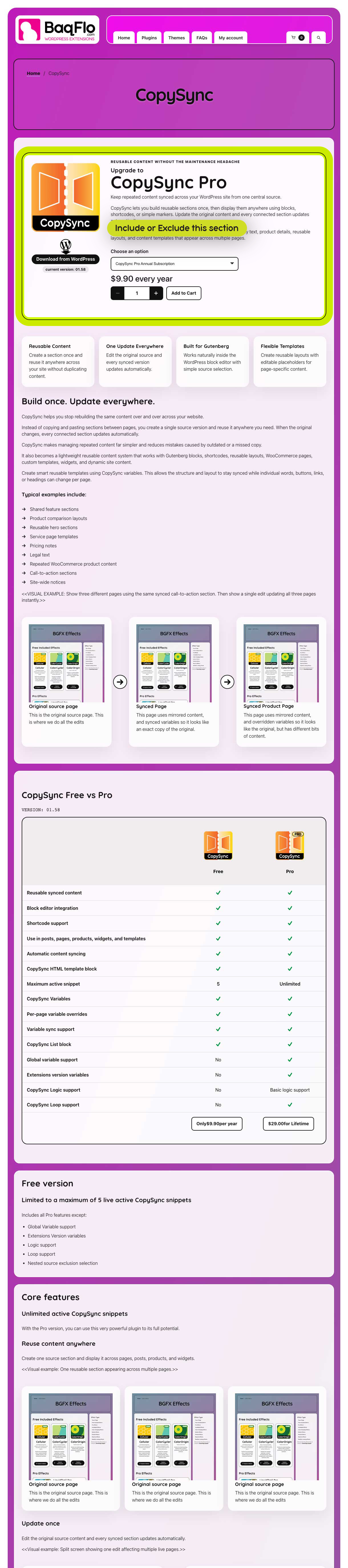

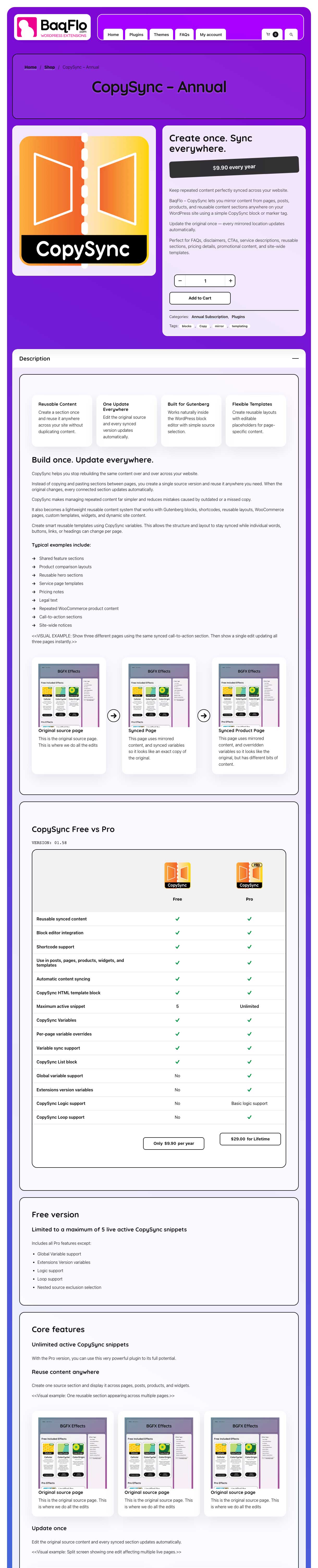
(the above Comparison is made using BeforeAfter plugin)
BaqFlo plugin integrations
Works even better together
CopySync becomes even more useful when combined with other BaqFlo plugins.

CopySync + SamePage
CopySync and SamePage work particularly well together for building large, easy-to-maintain one-page layouts.
Add SamePage anchors to your CopySync templates, then use CopySync List to automatically output all matching content. SamePage can then build a navigation menu from those anchors, allowing visitors to smoothly jump between sections on the page.
We use this approach on our Plugins and Effects pages. CopySync List automatically displays all available extensions, while SamePage generates the navigation menu shown alongside the content. When a new extension is added, it automatically appears in both the content list and the navigation menu, eliminating the need to manually update the page structure each time.
This makes it easy to create product directories, feature showcases, documentation hubs, team listings, service catalogues, and other content-rich pages that continue to grow over time.
CopySync + WooIn
CopySync and WooIn make it easy to build reusable WooCommerce content that stays consistent across your website.
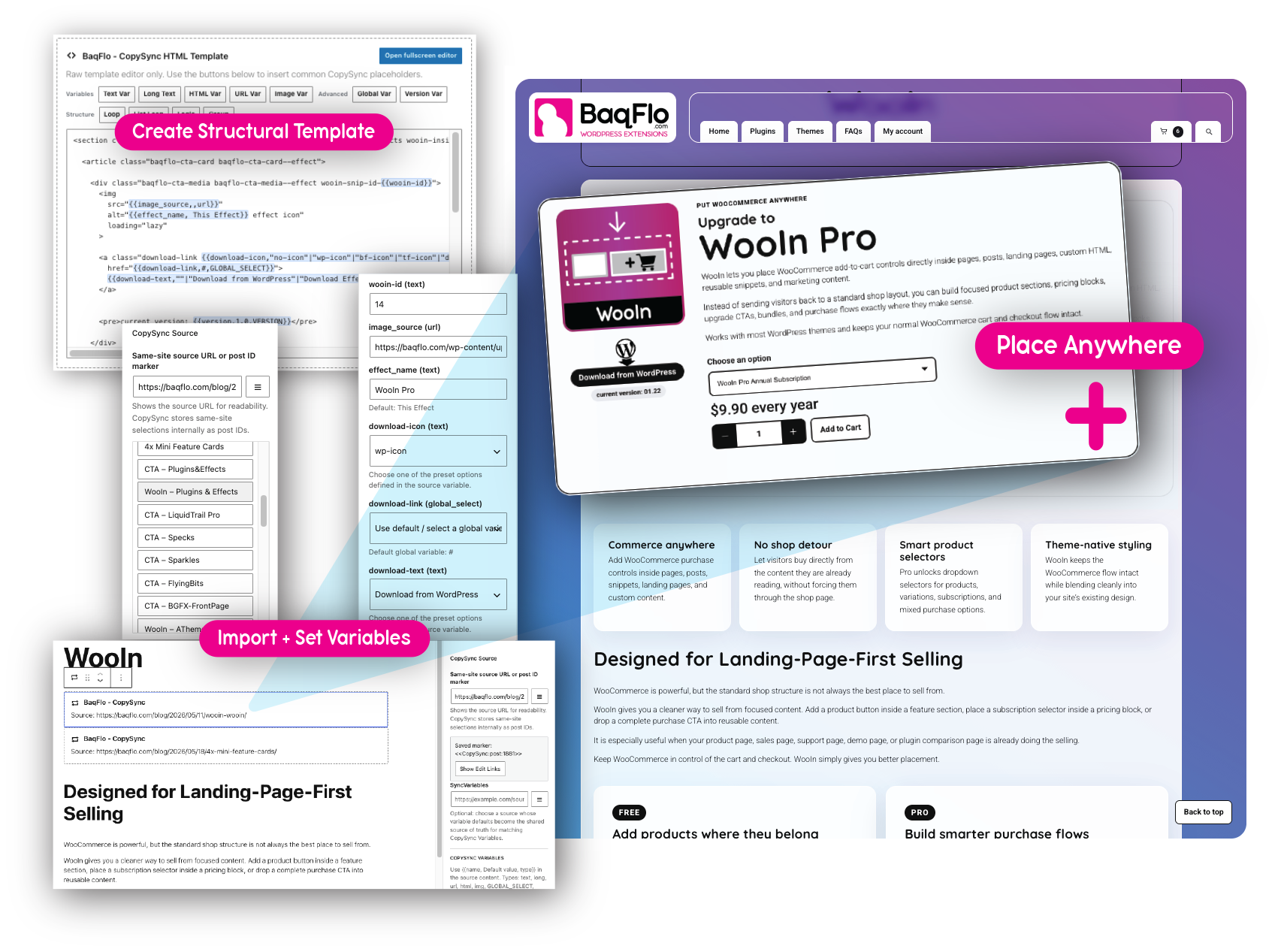
Create product purchase sections, feature grids, promotional banners, product selectors, notices, and call-to-action layouts once, then reuse them anywhere with CopySync. Because WooIn blocks can be safely embedded inside CopySync content, updates only need to be made in one place.
We use this combination throughout our own website. The purchase sections shown at the top and bottom of this page are built using WooIn and then reused with CopySync. This allows us to maintain a single source for the layout and product settings while displaying the same section in multiple locations, and in multiple pages using different content.
For stores with many products or landing pages, this can significantly reduce duplicate content and make site-wide updates much easier to manage.
Use Cases
Service websites
Keep shared service descriptions, guarantees, and call-to-action sections synced across multiple service pages.
WooCommerce stores
Reuse product information, shipping notices, comparison sections, warranty details, and promotional layouts.
Agencies & freelancers
Create reusable client layouts and editable templates that are easy to maintain long-term.
Landing pages
Build reusable conversion sections and update campaigns from one central source.
Membership / course sites
Maintain synced lesson notices, onboarding content, member information, and reusable educational layouts.
Large content websites
Reduce repetitive editing across blogs, directories, product catalogues, and multi-page websites.
Developer workflows
Use CopySync as a lightweight reusable content system inside custom WordPress builds.
Site-wide notices
Quickly update announcements, policy text, alerts, disclaimers, or seasonal messages across your entire website.
Reusable Content Without the Maintenance Headache
Upgrade to
CopySync Pro
Keep repeated content synced across your WordPress site from one central source.
CopySync lets you build reusable sections once, then display them anywhere using blocks, shortcodes, or simple markers. Update the original content and every connected section updates automatically.
Perfect for shared calls-to-action, pricing notes, feature lists, policy text, product details, reusable layouts, and content templates that appear across multiple pages.
What’s new?
View the latest updates, improvements, fixes, and upcoming features we have planned for CopySync.
Documentation
Learn how to build reusable content, variables, templates, loops, and advanced CopySync workflows.
Need help?
Browse FAQs, troubleshooting guides, and support resources, or contact us directly.