
Turn Any WordPress Theme Into a Smooth One-Page Experience
Upgrade to
SamePage Pro
SamePage adds smooth-scrolling section navigation to WordPress without forcing you into a page builder, custom theme, or dedicated one-page template.
Choose which headings, sections, products, or custom elements should become navigation targets, then add those links directly through the familiar WordPress Menu Editor. Build a complete one-page navigation system, a hybrid multi-page menu, or simply improve navigation on your longest content pages.
Whether you're creating landing pages, service pages, documentation, WooCommerce showcases, FAQs, or knowledge bases, SamePage helps visitors find the information they're looking for faster.
No theme lock-in. No rebuild required. Just cleaner navigation for content that deserves to be explored section by section.
Smooth Scrolling Navigation
Help visitors move through long pages quickly and naturally.
Automatic Section Detection
Generate navigation targets directly from your content.
Multi-page friendly
Create one-page, multi-page, or hybrid navigation systems across pages, posts, and products.
Theme friendly
Works with most WordPress themes without overwriting existing IDs or forcing visual styling.
Smooth One-Page Navigation without rebuilding your website
Most one-page navigation systems expect you to build your website around them.
SamePage works the other way around.
Instead of replacing your existing navigation, forcing a page builder, or requiring a dedicated one-page template, SamePage enhances the content you already have. It automatically creates navigation targets from headings, sections, products, custom wrappers, or any CSS selector that makes sense for your layout.
Those navigation targets can then be added directly to your WordPress menus, allowing you to build one-page navigation using the same tools you already know. Reorder links, combine them with normal pages, create section-based navigation, or build hybrid menus that work across multiple pages. SamePage keeps the workflow familiar while making large pages significantly easier to explore.
Because SamePage integrates directly with the WordPress Menu Editor, site owners don't need to learn a new navigation system. Navigation links can be generated from headings, sections, page content, posts, WooCommerce products, or custom selectors, and can be filtered by page, post, or product to keep larger websites organised.
SamePage is also designed to work with real WordPress websites. It uses a non-destructive anchor system that avoids overwriting existing IDs and doesn't force styling onto your theme. Whether you're building business websites, agency sites, long-form landing pages, WooCommerce showcases, documentation, portfolios, or hybrid one-page experiences, SamePage adds smoother navigation without locking your site into a specific theme, builder, or workflow.
SamePage Free vs ProVERSION: 1.02 |
 Free
Free
|
 Pro
Pro
|
|---|---|---|
| Automatic anchor generation | ✓ | ✓ |
| Cross-page linking | ✓ | ✓ |
| Custom anchor selectors | ✓ | ✓ |
| SamePage Links menu integration | ✓ | ✓ |
| Smooth scrolling navigation | ✓ | ✓ |
| Active section detection | ✓ | ✓ |
| Active menu highlighting | ✓ | ✓ |
| Top of Page anchors | ✓ | ✓ |
| Gutenberg SP Link button, which also allows cross-page linking | ✓ | ✓ |
| Page-level anchor management | ✓ | ✓ |
| Auto-generated navigation anchors | ✓ | ✓ |
| Custom data-samepage anchors | ✓ | ✓ |
| Recrawl and refresh tools | ✓ | ✓ |
| SamePage Navigation Widget | No | ✓ |
| Sidebar navigation menus | No | ✓ |
| Existing menu integration | No | ✓ |
| Auto-included navigation links – .samepage-auto support | No | ✓ |
| Custom auto-include selectors, and named auto-include anchors | No | ✓ |
| Per-page navigation modes | No | ✓ |
| Automatic sticky header detection, and manual sticky offset control | No | ✓ |
| Mobile menu auto-close | No | ✓ |
| Scroll-spy sensitivity controls | No | ✓ |
| Floating Back To Top button option | No | ✓ |
| Clean text anchor URLs, and hide hash after scrolling | No | ✓ |
| Pricing | Free |
Only $19.90 per year
or $59.00 for Lifetime |
Core features (Free)
Automatic anchor generation
SamePage automatically creates anchor targets from your content without modifying existing IDs or theme structures.
Navigate Across Your Entire Website
Link directly to headings and anchors on other pages, not just the page you’re editing.
SamePage links menu integration
Add SamePage navigation links directly inside WordPress menus without manually copying anchor URLs.
Active section detection
Automatically detect which section is currently visible and update navigation states as visitors scroll.
Top of page anchors
Automatically generate a top-of-page anchor for quick navigation back to the beginning of the content.
Custom manual anchors
Create developer-controlled navigation points using: data-samepage="Pricing"
Custom anchor selectors
Choose exactly which elements should become navigation targets using CSS selectors.
Example, h2, section, .pricing-section, #faq etc.
Smooth scrolling navigation
Transform standard anchor links into smooth scrolling navigation while maintaining normal browser fallback behaviour.
Active menu classes
Apply BFSP-active and BFSP-inactive classes to menu items for custom styling.
Gutenberg SP Link button
Create SamePage links directly inside the editor without manually searching for anchor names.
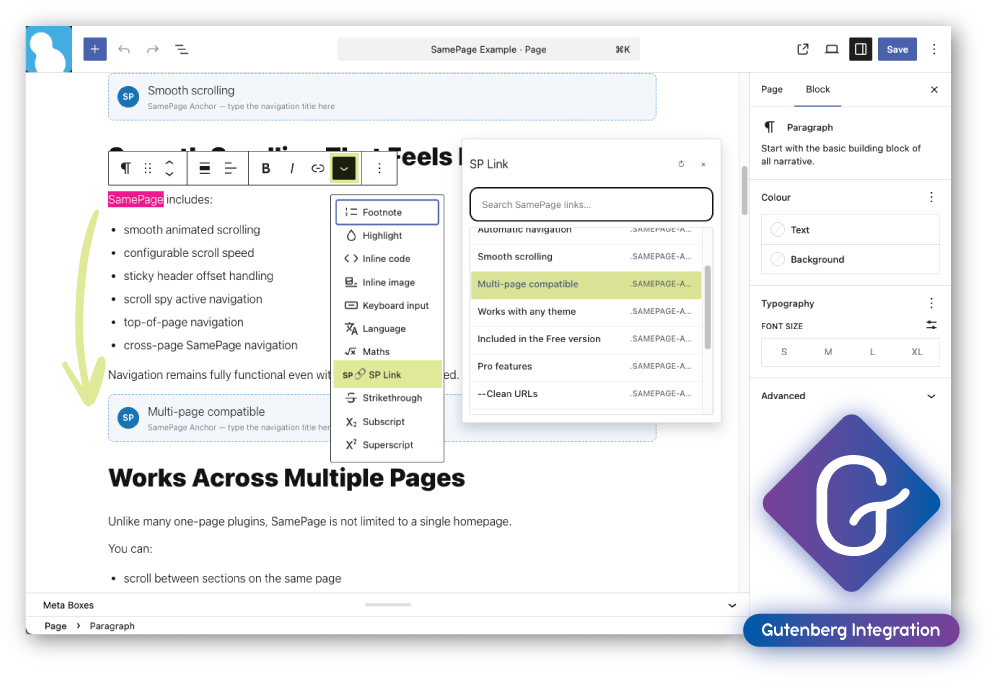
SP Link button also supports links between pages. Enter / in the search box to browse pages containing SamePage anchors, then select the section you want to link to.
The generated link automatically opens the target page and scrolls directly to the selected section, making inter-page navigation quick to create and easy to maintain. Click this Example. (it will take you back here after)
Pro features
More Powerful Navigation. Less Manual Management.
SamePage Pro is designed for websites with large amounts of content, complex navigation structures, documentation systems, and reusable layouts. Automatic navigation generation, widget support, sticky-header awareness, and advanced navigation controls help keep large sites easy to explore.
SamePage navigation widget
Display page-specific navigation in sidebars, documentation layouts, landing pages, and content hubs.
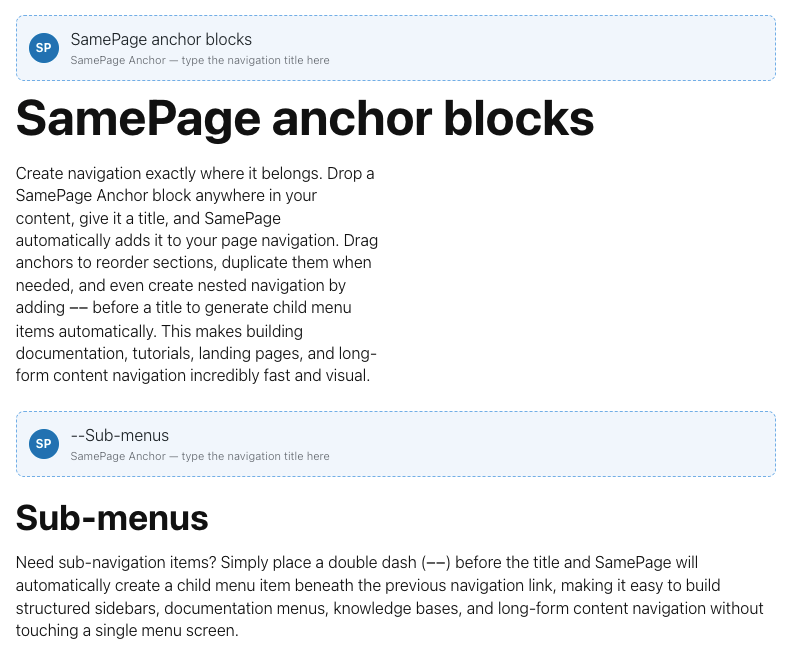
SamePage anchor blocks
Create navigation exactly where it belongs. Drop a SamePage Anchor block anywhere in your content, give it a title, and SamePage automatically adds it to your page navigation. Drag anchors to reorder sections, duplicate them when needed, and even create nested navigation by adding -- before a title to generate child menu items automatically. This makes building documentation, tutorials, landing pages, and long-form content navigation incredibly fast and visual.
.samepage-auto support
Simply add: .samepage-auto and SamePage automatically includes the section in generated navigation.
Named auto-include anchors
Assign custom navigation labels directly within the page structure. data-samepage-auto="Pricing"
Automatic sticky header detection
Detect sticky headers automatically and compensate during scrolling.
Scroll spy sensitivity controls
Fine-tune when navigation items become active.
Auto-included navigation links
Automatically build navigation from marked sections without manually selecting anchors.
Custom auto-include selectors
Create global rules for documentation sections, FAQs, chapters, product showcases, and more.
Existing menu integration
Use existing WordPress menus instead of generated navigation structures. Perfect for complex sites and mixed navigation systems.
Mobile menu auto-close
Automatically close mobile navigation after a SamePage link is selected.
Parent menu highlighting
Highlight parent navigation items when child sections are active.
Clean anchor URLs
Generate cleaner, more readable links for documentation and marketing pages.
Floating back to top button option
Provide quick access back to the beginning of long pages.
Hide hash (#) after scrolling
Remove anchor hashes after scrolling while preserving SamePage functionality.
BaqFlo plugin integrations
Works even better together
CopySync becomes even more useful when combined with other BaqFlo plugins.
CopySync + SamePage
CopySync and SamePage work particularly well together for building large, easy-to-maintain one-page layouts.
Add SamePage anchors to your CopySync templates, then use CopySync List to automatically output all matching content. SamePage can then build a navigation menu from those anchors, allowing visitors to smoothly jump between sections on the page.
We use this approach on our Plugins and Effects pages. CopySync List automatically displays all available extensions, while SamePage generates the navigation menu shown alongside the content. When a new extension is added, it automatically appears in both the content list and the navigation menu, eliminating the need to manually update the page structure each time.
This makes it easy to create product directories, feature showcases, documentation hubs, team listings, service catalogues, and other content-rich pages that continue to grow over time.
Documentation websites
Help visitors navigate large documentation libraries.
FAQ pages
Jump directly to answers without endless scrolling.
Product showcases
Navigate feature sections and comparisons quickly.
One-Page websites
Create smooth scrolling navigation experiences.
Service pages
Jump between services, pricing, and contact sections.
Knowledge bases
Improve navigation across long educational content.
Landing pages
Guide visitors through large sales pages.
Course content
Navigate lessons and training material more efficiently.
Turn Any WordPress Theme Into a Smooth One-Page Experience
Upgrade to
SamePage Pro
SamePage adds smooth-scrolling section navigation to WordPress without forcing you into a page builder, custom theme, or dedicated one-page template.
Choose which headings, sections, products, or custom elements should become navigation targets, then add those links directly through the familiar WordPress Menu Editor. Build a complete one-page navigation system, a hybrid multi-page menu, or simply improve navigation on your longest content pages.
Whether you're creating landing pages, service pages, documentation, WooCommerce showcases, FAQs, or knowledge bases, SamePage helps visitors find the information they're looking for faster.
No theme lock-in. No rebuild required. Just cleaner navigation for content that deserves to be explored section by section.